> ## Documentation Index
> Fetch the complete documentation index at: https://docs.userjourneys.ai/llms.txt
> Use this file to discover all available pages before exploring further.

# PostHog Setup

> Follow these steps to create and configure your PostHog API key with userjourneys.ai

## Creating your API key

<Steps>
  <Step title="Navigate to PostHog API settings">
    Go to <a href="https://eu.posthog.com/settings/user-api-keys" target="_blank" rel="noreferrer">eu.posthog.com/settings/user-api-keys</a>.

    <Tip>
      If your project is in the US, change the URL prefix to <code>us.posthog.com</code>.
    </Tip>
  </Step>

  <Step title="Click Create key">
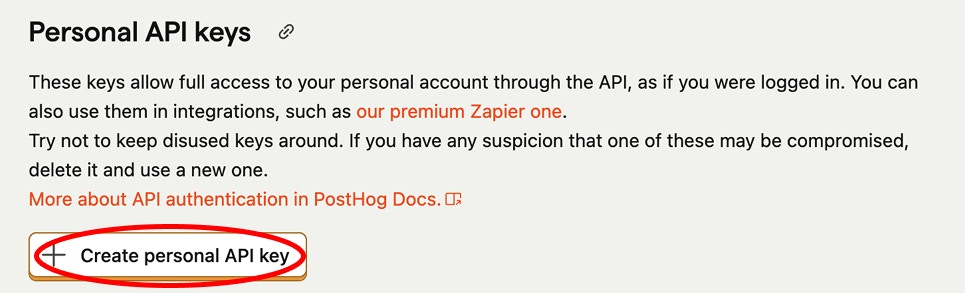
    Open the <strong>Personal API keys</strong> section and select <strong>Create personal API key</strong>.

    <Frame caption="PostHog API Keys settings with Create personal API key button">
      <img src="https://mintcdn.com/userjourneysai/d38eSOYmSu1pe0V2/images/posthog_create_key_1.jpg?fit=max&auto=format&n=d38eSOYmSu1pe0V2&q=85&s=506e18a6d890e07b2a5aadfebb5d2d89" alt="PostHog API Keys settings page showing the Create personal API key button" width="965" height="293" data-path="images/posthog_create_key_1.jpg" />
    </Frame>
  </Step>

  <Step title="Fill in the form">
    * Select <strong>Projects</strong>
    * Choose the project you want to integrate
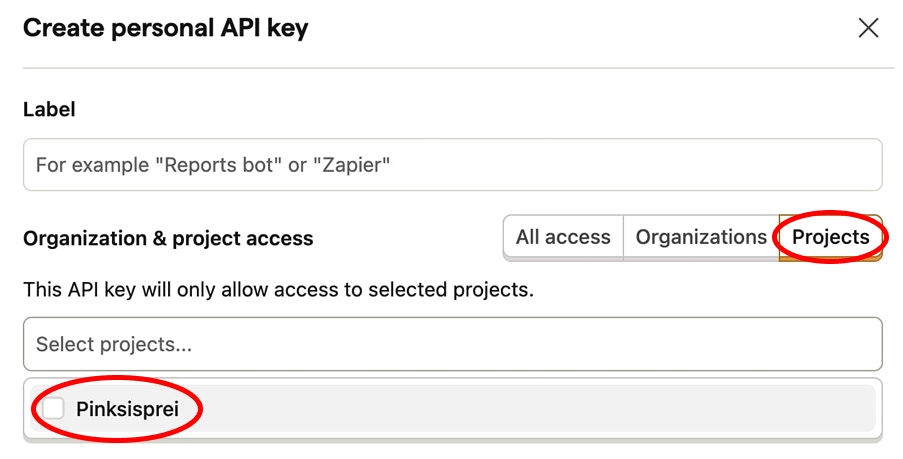
    <Frame caption="Create personal API key form with project selection">
      <img src="https://mintcdn.com/userjourneysai/d38eSOYmSu1pe0V2/images/posthog_project_selection_2.jpg?fit=max&auto=format&n=d38eSOYmSu1pe0V2&q=85&s=4824571b23723ea5e81485746b6c25a5" alt="Create personal API key form showing project selection and access tabs" width="903" height="459" data-path="images/posthog_project_selection_2.jpg" />
    </Frame>
  </Step>

  <Step title="Set access permissions">
    Select **MCP Server** from the Scopes dropdown.
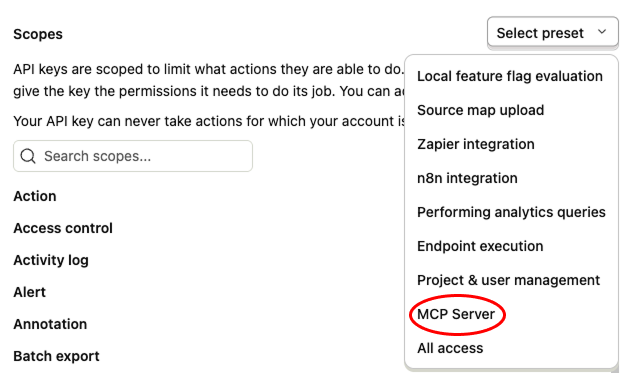
    <Frame caption="Select MCP Server from the Scopes dropdown">
      <img src="https://mintcdn.com/userjourneysai/gZzoJ8JJo7m8EEpt/images/mcp_server.png?fit=max&auto=format&n=gZzoJ8JJo7m8EEpt&q=85&s=ae68cd0ed7008610a9a9b0a65ab5fde7" alt="PostHog Scopes dropdown with MCP Server selected" width="625" height="373" data-path="images/mcp_server.png" />
    </Frame>
  </Step>

  <Step title="Create and copy your API key">
    Click <strong>Create key</strong> and paste it into the form at userjourneys.
  </Step>
</Steps>

<Check>
  You're all set
</Check>